Security and architecture
HachiGuard is payment integrity monitoring with automatic recovery for online shops. It watches the files and settings that decide where a payment goes, reports unauthorised changes and, under strict conditions, puts back a verified clean version.
Three parts, kept apart
- The sensor runs on your hosting, from the scheduler, outside the public folder. It has no rules of its own. It collects fingerprints and sends them.
- The central server holds the rules, compares each report with the last clean state and decides. The list of files to watch is set here, not by the sensor.
- The clean copies of your critical files are kept on our infrastructure, not on your hosting. Someone who gets into your hosting account cannot replace them.
What the sensor can do
- It runs as your own hosting user. It needs no root access and installs nothing on the server.
- It reads code files and, from the database, only the administrator records, the payment settings and a few platform settings, such as the site address and the list of extensions.
- It writes in one case only: when the central server orders a payment file to be restored.
- It never deletes a file. Before it replaces one, it keeps the replaced version in a private folder.
What leaves your site, and what never does
- Sent: fingerprints of files, the contents of the critical code files that changed, administrator usernames, and fingerprints (not the values) of administrator emails, passwords and payment settings.
- Never sent: orders, customers, card numbers, or any page your visitors see.
- Every message is signed in both directions and carries a time stamp and a one-time number, so it cannot be altered or replayed.
When a file is restored automatically
The decision is made by fixed rules, not by AI, so the same facts always give the same decision and each one can be explained. All of the following must hold:
- the file is a payment or checkout file,
- the change adds a payment destination we do not recognise,
- no upgrade of the platform or of that extension is in progress,
- a verified clean copy exists.
Any other change is reported and waits for your approval. It is not undone.
Before the sensor writes, it checks that the file on disk is still exactly the one that was analysed, that it is not a link to somewhere else and that it sits inside your site. The write is done in one step, so a half-written file cannot be left behind. The sensor then confirms the result to the central server.
The changed version is kept as evidence. If the change was yours, you can put it back from your panel with one button. Every automatic restore comes with a decision record: the rule, the file, the destination, whether an upgrade was running and the fingerprints before and after.
An example
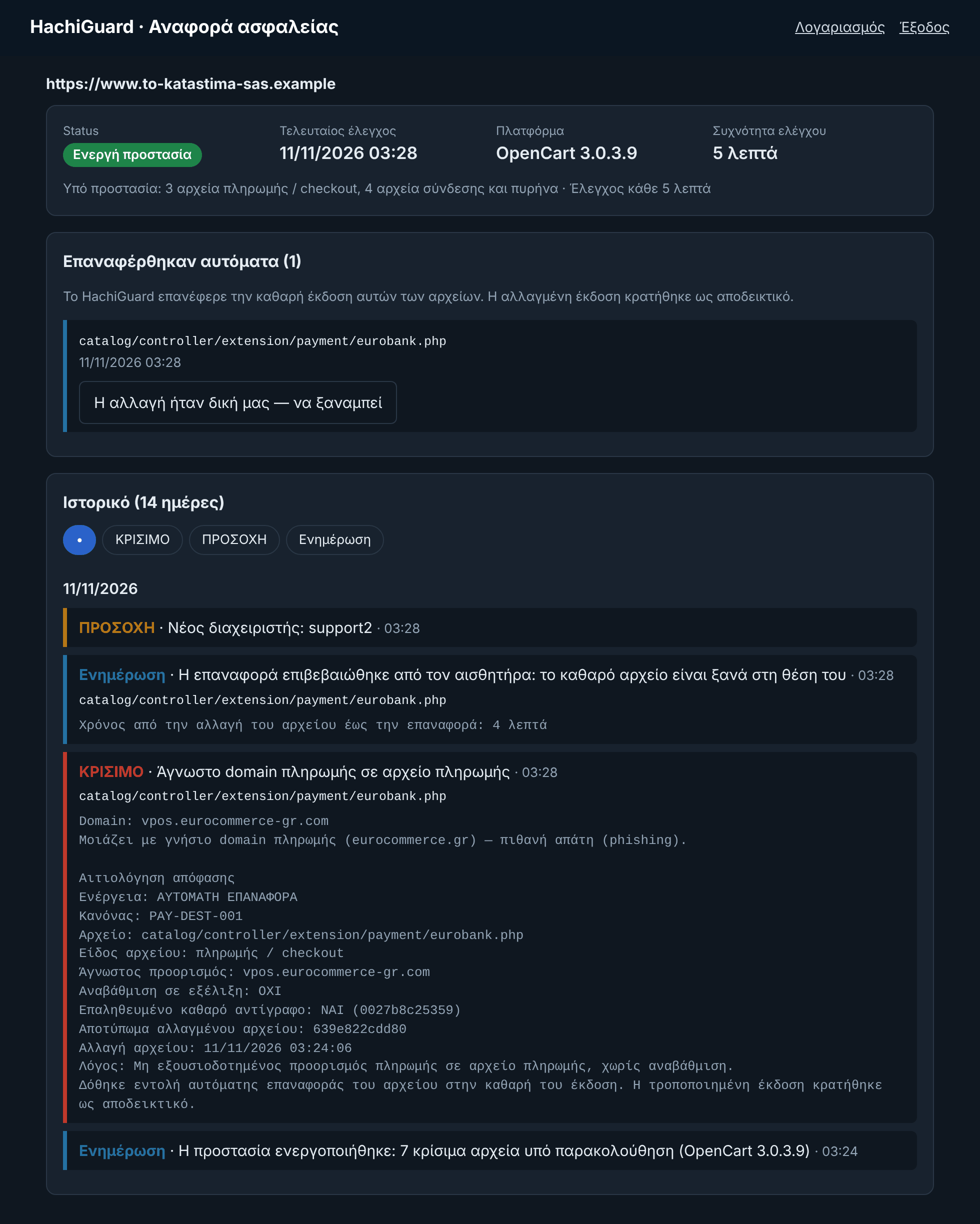
This is the panel of a test shop. We changed the payment address in one file ourselves, to an address that looks like the real one. At the next check the change was found, the clean file was put back and the sensor confirmed it.
What we tested
Controlled tests on a test shop, version 1.12:
- Time from tampering to restore, with a check every minute. We changed the payment address in a payment file 8 times, at random moments within the minute. All 8 times the change was found and the clean file was put back at the very next check: between 8 and 57 seconds after the tampering, 33 on average. Once a check starts, detection and restore take under one second, so the wait is set by the interval of your plan.
- 100 controlled changes of six kinds, on OpenCart and WooCommerce test shops. All 100 were found and the clean file was put back. In the same run we made 100 ordinary developer changes: none was undone and none raised an alarm.
- The file changes again between analysis and restore. The restore was not applied, the newer version stayed in place and was checked on the next run.
- The file is swapped for a link (symlink) before the restore. The sensor refused to write and one critical alert was sent.
- The same message is sent twice, or altered on the way. The second was rejected as a replay, the altered one as an invalid signature.
- The central server is unavailable. The sensor changed nothing on the site. When the server came back, the change made in the meantime was found and the file was restored. While the server does not answer, no checks take place.
- A stolen panel password. Signing in was possible, but approving a change was not: it needs the code sent to the owner's email. Six guessed codes failed and the owner was notified.
- Undo of a restore from the panel. With the emailed code, the change was put back at the next check.
- The sensor's own file is modified, or it suddenly reports far fewer files. Critical alert at the next check.
- A lookalike script and a form sending data elsewhere appear on the public page. The outside check raised a critical alert.
- These are our own controlled tests on test shops, on the same machine as the central server. They are not an independent audit, and a real installation adds network delay.
Your panel
- Reports and approvals are available only after sign-in. There are no open report links.
- Passwords are stored hashed. After five wrong attempts the account locks for fifteen minutes.
- Approving a change or undoing a restore also needs a code that is sent to your email at that moment. A stolen panel password is not enough.
- Every approval and every undo is recorded with the user and the address it came from, and is sent by email to the owner and to our team.
A second look, from the outside
Every six hours our server also opens your public pages the way a visitor does, and compares the outside domains they load with the last time. A new script from a lookalike domain or from an open code-hosting service, or a form that starts sending data elsewhere, raises an alert. This check does not depend on the sensor.
How long we keep data
- The event history is kept for 90 days.
- Clean copies are kept while the subscription is active and are deleted when it ends.
Limits we state openly
- HachiGuard does not replace a firewall, an antivirus or a PCI scan. It is the layer that notices and reverses a change after someone has got in.
- A script loaded on your checkout from a third party's server can be changed on that server without any file of yours changing. We notice a new outside domain, but not a change inside a script that was already there.
- If your whole hosting account is taken over, a sensor that runs inside it cannot be fully trusted. This is why the clean copies, the rules and the decisions live outside it, and why a silent or altered sensor raises an alarm.
- Encoded files cannot be read. We track them by fingerprint and report every change, but we do not restore them automatically.
- The first check takes the current state as clean. Review your administrators and payment addresses before it runs.
- Detection happens at the interval of your plan. A change made just after a check is seen at the next one.